 Mozilla Thunderbird 102.3.2
Screenshots of Mozilla Thunderbird
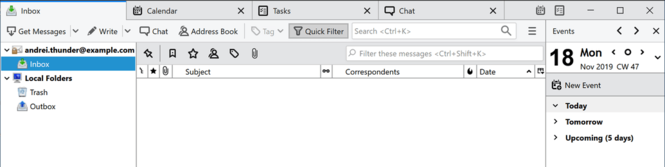


Mozilla Thunderbird Editor's Review
Get access to your email with one of the easiest to use Windows apps available today.
If you like the convenience of mail in the cloud but prefer a dedicated email client, then this one is for you. Mozilla has one of the best compromises available. Thunderbird for Windows is one of the best email clients and it has all of the benefits of one of the best browsers in the world.
Mozilla Thunderbird's Mail Account Setup Wizard helps you quickly and easily setup access to your mail accounts. Prior to this feature being here, you had to know your IMAP, SMTP, and SSL/TLS settings. Now all you need to provide is your name, email address, and password. Once entered, the email account set up wizardry will check our database and find the email settings for you. Moments later, you have access to your mail account.
If you've used Firefox, Thunderbird will be familiar to you, as the interfaces are similar – both are tabbed. The user experience is similar and users of one will find it easy to use the other. In fact, the user experience across all Mozilla apps are similar, and users on any platform will be instantly at home. Double clicking on any individual message will open it. You can keep multiple emails open at one time, without cluttering up your screen. A tab menu on the Tab toolbar helps you switch between tabs. When you exit Thunderbird, open tabs will be saved; and will be restored when you reopen Thunderbird.
App Pro’s: Firefox companion, automated updates, easy to use, FREE
App Con’s: tabbed mail interface may not work for everyone
Conclusion: Thunderbird is simple and easy to use. Once installed, keeping it up to date is easy, as updates are automatically pushed to your PC. With its One Click address book you can easily add contacts from the messages you receive. The app is easy to use and offers a wealth of features that make it one of the best Windows email clients available. The fact that it's free just makes this a no brainer.
Mozilla Thunderbird Publisher's Description
Thunderbird provides the most effective tools for detecting junk mail. Our tools analyze your e-mail and identify those that are most likely to be junk. You can automatically have your junk mail deleted or you can put it in a folder you specify, just in case you like reading junk mail. What's New in Thunderbird 3:Tabs and SearchIf you like Firefox’s
Read moreOther Languages
Look for Similar Items by Category
Feedback
- If you need help or have a question, contact us
- Would you like to update this product info?
- Is there any feedback you would like to provide? Click here
Beta and Old versions
Popular Downloads
-
 Macromedia Flash 8
8.0
Macromedia Flash 8
8.0
-
 Kundli
4.5
Kundli
4.5
-
 My Talking Tom
1.0
My Talking Tom
1.0
- FastSum 1.9
-
 FastSum Standard Edition
1.6
FastSum Standard Edition
1.6
-
 Cool Edit Pro
2.1.3097.0
Cool Edit Pro
2.1.3097.0
-
 Cheat Engine
6.8.1
Cheat Engine
6.8.1
-
 Hill Climb Racing
1.0
Hill Climb Racing
1.0
-
 Windows XP Service Pack 3
Build...
Windows XP Service Pack 3
Build...
-
 C-Free
5.0
C-Free
5.0
-
 Horizon
2.9.0.0
Horizon
2.9.0.0
-
 Tom VPN
2.2.8
Tom VPN
2.2.8
- HP LaserJet 1100 Printer Drivers 4.3.2.5
-
 Mozilla Firefox
108.0...
Mozilla Firefox
108.0...
- HP WLAN 802.11a/b/g W500 2.4.1.30
-
 Iggle Pop
1.0
Iggle Pop
1.0
- HP Deskjet 5400 Series (DOT4) 9.0.0.0
- HP LaserJet 4200 PS 60.3.14.2
-
 Vector on PC
1.0
Vector on PC
1.0
-
 FormatFactory
4.3
FormatFactory
4.3